
How to Remove the "ⓘ AI" Label from Google Play Store Screenshots
Google Play overlays an AI info badge on store listing screenshots when its scanners detect hidden AI markers. UnlabelAI cleans these tags in your browser so your app screenshots display cleanly without badges.
Drag & Drop Photos Here
Lower Listing Conversion Rates (CVR) & Obscured Screenshot UI
The "ⓘ AI" corner badge creates immediate friction and skepticism during user app discovery. Potential users frequently assume apps with AI-badged screenshots are low-effort "AI wrappers," non-functional clones, or scam apps with fabricated UI, cutting listing conversion rate (CVR) and organic install velocity. Furthermore, the persistent badge in the bottom-right corner directly obstructs vital user interface elements like bottom navigation bars, primary action buttons, pricing notes, and compliance disclaimers.
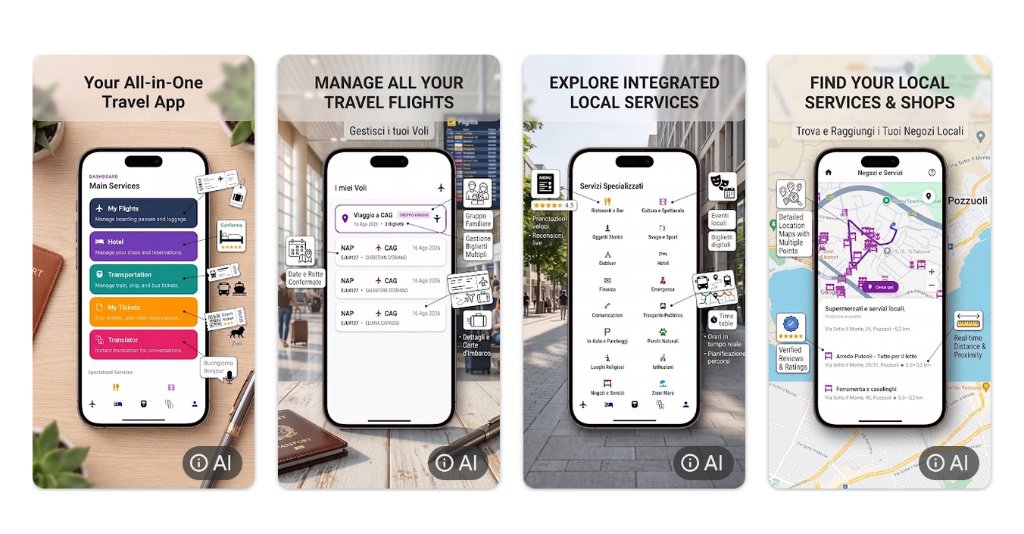
Real-world Google Play Store listing showing the automated ⓘ AI badge overlay in the bottom-right corner of AI-assisted promotional screenshots.
How Google Play Store Flags AI Media
Tier 1: C2PA Container & Provenance Ingestion
Google Play Console ingestion filters scan uploaded JPEG, PNG, and WebP files for cryptographically signed hidden C2PA manifests, Adobe Firefly metadata, and AI generator tags embedded during export.
Tier 2: Visual Watermarks & Play Console Declaration
Google scans image frequencies for imperceptible watermarks (such as DeepMind SynthID) and correlates upload metadata with the mandatory Google Play Console AI Asset Declaration questionnaire.
Cleans hidden AI tags and softens synthetic pixel patterns directly in your browser memory so uploads pass reach filters without quality loss.
How to Remove the "ⓘ AI" Label in 3 Steps
- STEP 01
Export Your Visual
Export your visual from your AI generator or editing tool to your device.
- STEP 02
Sanitize in Unlabel AI
Drop the file into Unlabel AI to clean C2PA tags and blend pixel patterns in your browser.
- STEP 03
Download & Publish Clean
Download the clean file and post it to Google Play Store without triggering automated tags.
Google Play Store AI Label Removal FAQ
Related Platform Guides
Create with AI. Reach your full organic audience
Keep posting AI-improved content without losing views
Cancel anytime